

Google Maps
A new feature that allows users to customize their routes using public transit or biking on Google Maps App
Duration
80 hours
Figma, Whimsical, Mural
Tools
Product Design Lead (UX/UI)
Role
UX Researcher
Google Maps strives to provide accurate navigation and mapping services to help users make informed decisions and explore the world efficiently. However, while Google Maps offers reliable and up-to-date information, the “best” routes aren’t always necessarily the best route for all users. Specific to public transit, Google Maps does not often take into account train delays, route safety, and other factors when navigating the user to their end destination.
Introduction
Google Maps is in need of a new feature that allows users to tailor their preferences to curate a route that best suits their needs.
Solution
Research
User Interviews
I interviewed a handful of users who primarily use Google Maps as their navigation app to understand their travel habits and frustrations with the application. Key insights include challenges in finding the most efficient route and finding a route that is as safe and easy to use.
“Once, I got off on the wrong train stop and Google Maps routed me to a completely different train line. I wished it had provided a new route staying on the same train I was already on.”
“ I would like an option to check off/select which routes I want to use. Or even filter out routes I want to avoid.”
“I generally like playing around with my options in case the subway is down or if I really want to take a specific train line. If a train line is down, Google Maps does not update when there are subway issues.”
Competitive Analysis
To assess Google Maps’s competitive position, I performed a SWOT analysis of two fellow players in the navigation industry: Apple Maps and TrailLink.
Apple Maps
-
Integrates public transit information into route planning
Displays departure times, stops, and connections
Walkable/pedestrian routes display terrain of footpaths and pedestrian walkways (i.e. mostly flat, gentle hills)
“Share my ETA” feature allows you to share your estimated time of arrival with contacts
-
Public transit coverage is not as extensive as Google Maps
Availability of certain modes of transport like cycling are limited to specific cities / might not cover all regions
Walkability information is not very detailed (once you arrive at your destination, it does not specify how much farther you have to walk)
Lacks real time updates on different transportation options and integration with multiple transportation providers
-
Display environmental impact of routing suggestions and eco-friendly options for users to choose
Utilize AR or AI technology to improve route suggestions
-
Google Maps has a loyal user base and competitive features
Evolving data privacy regulations may impact the functionality of Apple Maps
TrailLink
-
Comprehensive database for trails across the U.S.
User-friendly interface
GPS technology integration
Accessibility to maps while offline / poor signal
-
Limited global coverage of trails (limited to the United States)
Lack of advanced features
Subscription-based model can be a barrier to entry for new users
-
Global expansion of trail coverage (beyond the United States)
Collaborations/partnerships with outdoor/active brands
Advanced application features
-
Competition from other apps in the industry with advanced features and aggressive marketing strategies
Data privacy concerns
Economic recession could lead to reduced spending on recreational outdoor activities
Waze
-
Real-time traffic updates
Community-driven platform
Navigation with dynamic routes
Integration with Google services
-
Dependency on user-generated data
Limited offline functionality
-
Global expansion
Expansion of features
-
Competition with Google Maps
Regulatory changes
Customer Journey Map
The new feature in Google Maps unfolds with users first discovering the feature through app updates or announcements. As users engage, they seamlessly integrate the new feature into their daily commute or recreational activities, experiencing the benefits of personalized route planning. The customer journey map guides users through route adjustments, highlighting transit options or bike-friendly paths, ultimately leading to a more efficient and enjoyable travel experience. The user feedback loop ensures continuous improvement, aligning the app's evolution with each traveler's unique needs, thereby solidifying Google Maps as a go-to tool for personalized and stress-free navigation.
User Personas
Project Details
User Flows
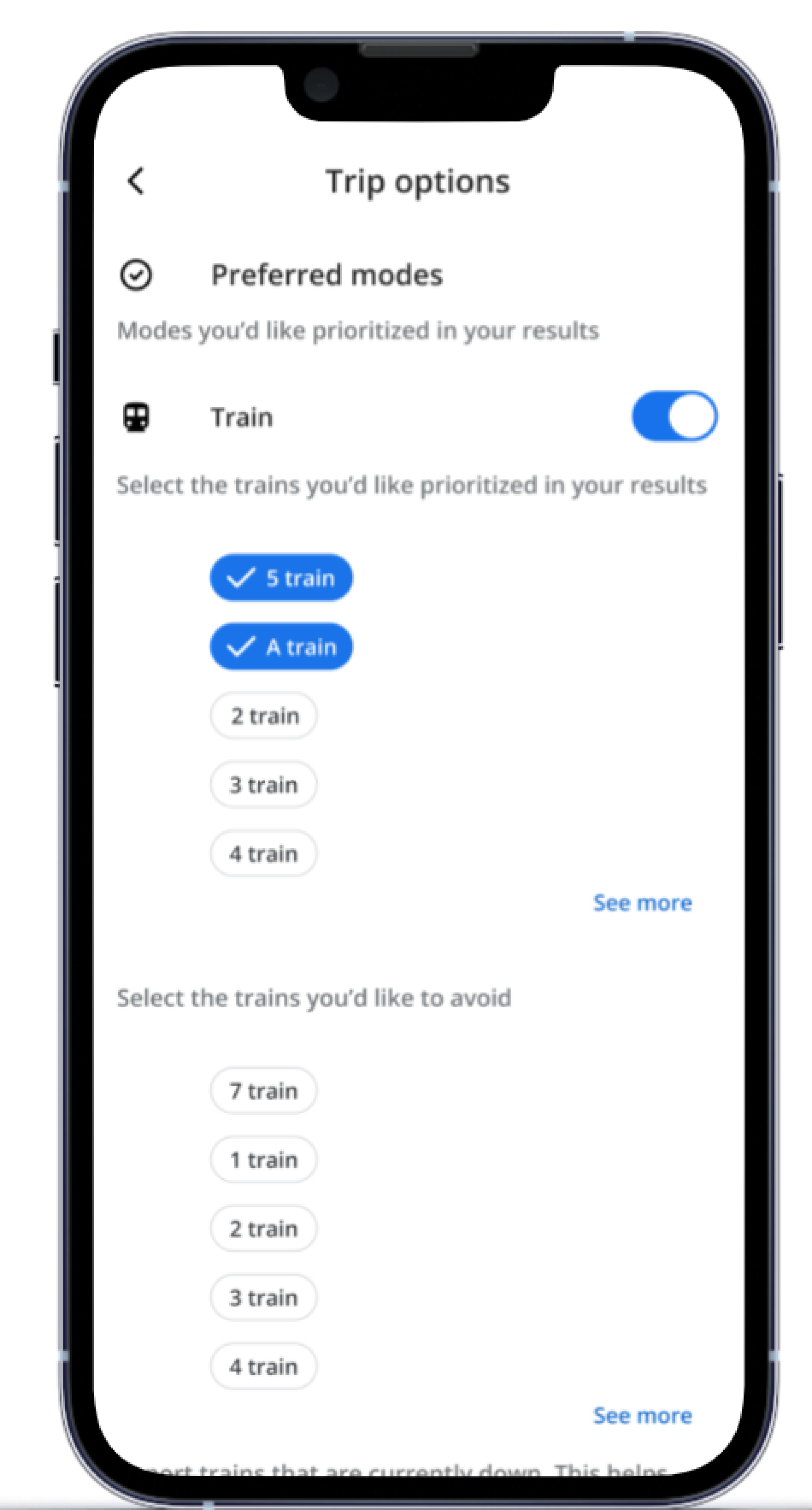
With the newly added feature on Google Maps, users can now personalize their public transport and biking routes for a tailored experience. Upon entering a destination address and selecting “Directions,” a route suggestion page will populate where users can select either the public transit or biking option and subsequently view each respective route suggestion page. Within the “options” page, users can customize their public transit routes by selecting preferred trains or trains to avoid. Similarly for biking routes, users can set preferences to avoid busy areas or prioritize paved roads, for example.
Train Routes
Biking Routes
Wireframes
Working within an existing design system, I created new screens that were consistent with the overall user experience in Google Maps. I incorporated multiple modes of travel while leaving room for additional customization in future iterations.
Lo-fi Wireframes
I designed hi-fidelity screens consistent with the existing design system utilized in Google Maps, ensuring a seamless onboarding process for existing users. This straightforward yet impactful new feature enables users to effortlessly coordinate various modes of transportation and save personalized travel preferences.
Hi-fi Wireframes
Usability Testing
I recruited participants, the majority of which commute via public transportation, for usability testing to determine usability rating, common pain points, and suggestions for improvement.
Suggestions included adding the ability to avoid certain paths when biking (i.e. busy areas, construction zones).
User identified the misplacement of biking route options under the public transit icon.
Users provided positive feedback on ability to customize routes.
Results
Priority Revisions
A priority revision stemming from the usability testing results was to enhance the customization of biking routes. Users now have the option to tailor their biking paths further, like avoiding busy areas and construction zones. This revision empowers bikers to plan safer and more enjoyable rides while reinforcing Google Maps’ commitment to providing user-centric navigation experiences.
Original
Revision #1
Final Prototype
Customize train routes
Customize bike routes
If I were to continue building out this new feature in Google Maps, I would enhance the walk options and allow users to customize their walking routes based on path grade, busy areas and safety. This would be an exciting addition to the app’s functionality while simultaneously prioritizing the user’s needs and fostering greater engagement with Google Maps.
Next Steps
Reflecting on this project, creating a new personalized route feature for Google Maps highlighted the importance of user empowerment and adaptability. Through iterative design and collaboration, the successful integration of this newly added feature underscores the impact of empathetic design and the need for ongoing innovation. This experience will guide my future designs, encouraging me to engage in open communication and recognize that successful design is an evolving dialogue between designers and users.